15-09-2026
Publishing a book is an exciting achievement, but getting it in front of readers is the next major challenge. For authors in India, Amazon can provide a powerful online marketplace where readers can discover and purchase books.
If you are wondering how to sell your book on Amazon India, you need more than simply uploading a manuscript. You need to prepare your book professionally, choose the right publishing method, create an optimized Amazon listing, set an appropriate price, select relevant categories and keywords, and promote your book consistently.
For authors who want greater control over publishing and distribution, platforms such as Amazon Kindle Direct Publishing (KDP) can be an important part of the publishing strategy . At the same time, working with a professional publishing company can help with editing, formatting, cover design, distribution, and marketing.
This guide explains how to sell a book on Amazon India step by step, including what first-time authors should know before publishing.
Amazon is one of the most recognizable online shopping platforms in India, and books are an important part of its marketplace. Selling through Amazon can help authors reach readers beyond their local city or traditional bookstore network.
For independent authors, online distribution can provide several advantages:
Access to a large online customer base
Easier book discovery
Availability of print and digital editions
Convenient online purchasing
Opportunity to collect reader reviews
Potential to reach readers outside your local market
Better visibility for niche and regional books
However, being available on Amazon does not automatically mean that a book will generate sales. Your book still needs a strong listing, competitive positioning, professional presentation, and marketing.
Before learning how to sell your book on Amazon India, it is important to understand the difference between Amazon Kindle Direct Publishing (KDP) and other distribution arrangements.
KDP allows authors and publishers to publish eligible books in formats such as eBooks and print editions through Amazon's publishing ecosystem.
The KDP setup process includes entering book details, uploading the manuscript and cover, selecting rights, and setting pricing and royalty information. Amazon states that the information entered during book setup is used to create the book's Amazon detail page.
Authors can also work with a publishing company that handles publishing, printing, distribution, and marketplace availability.
This approach can be useful if you do not want to manage every technical aspect yourself.
For example, Shashwat Publication provides publishing-related support including editing, book design, printing, distribution, marketing, and digital publishing.
The best approach depends on your publishing goals, budget, level of experience, and how much control you want over the publishing process.
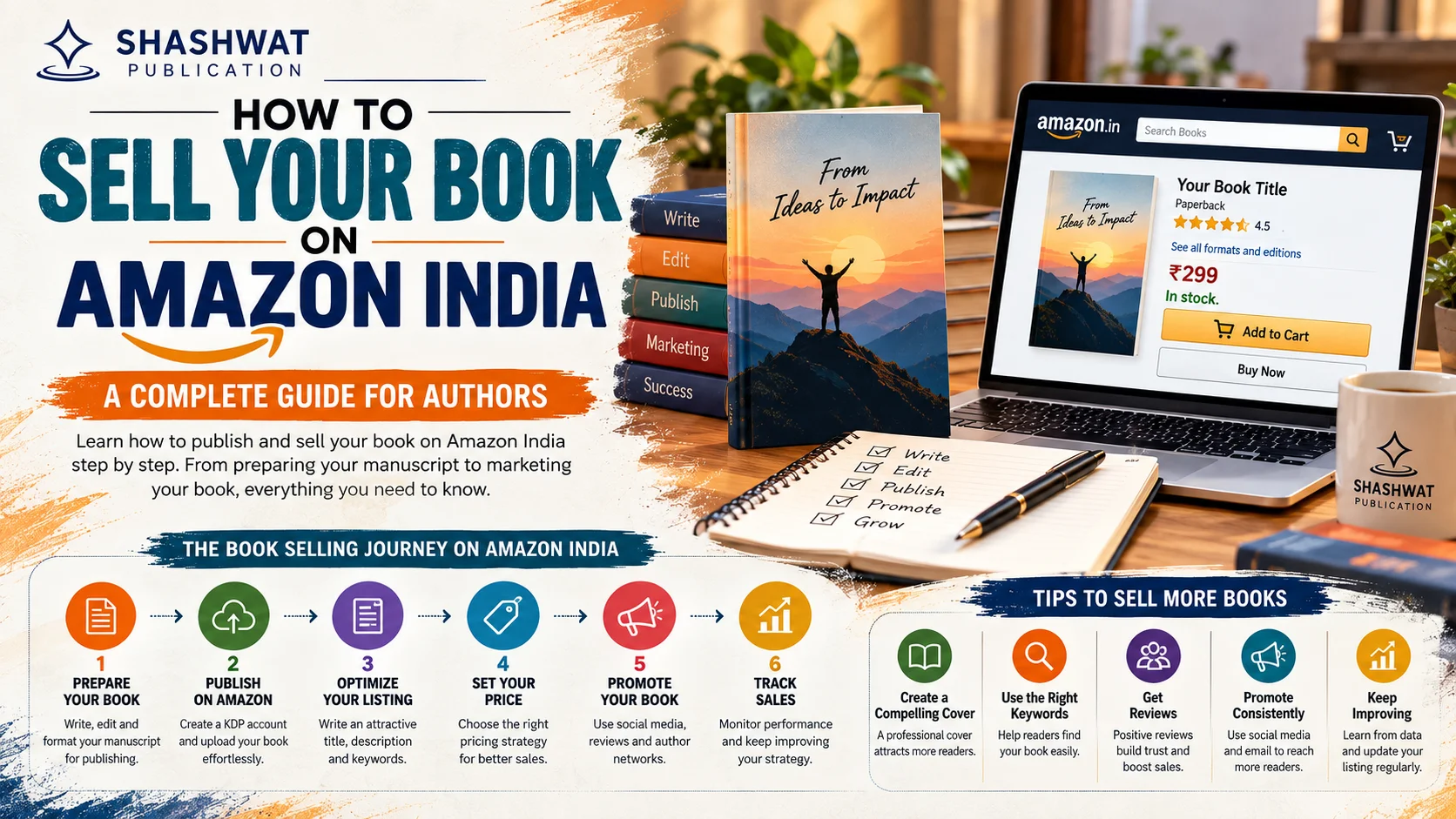
Selling a book on Amazon involves several important stages. Following a structured process can help you avoid common mistakes.
Before uploading your book to Amazon, make sure your manuscript is completely finished.
Do not rush to publish simply because the writing is complete.
Your manuscript should ideally go through:
Content revision
Structural editing
Copy editing
Grammar correction
Proofreading
Formatting
Final quality checks
Professional editing is particularly important for first-time authors because readers can quickly notice spelling mistakes, inconsistent formatting, weak sentence construction, or structural problems.
If you are still preparing your manuscript, you can also explore book publication services to understand the different stages involved in professionally preparing a book.
Before publishing on Amazon, decide which formats you want to offer.
Common options include:
An eBook allows readers to purchase and read your book digitally through compatible Kindle devices and apps.
A paperback gives readers a physical copy of your book and can be an important format for fiction, poetry, self-help, academic and general books.
Hardcover editions can be suitable for premium books, gift books, special editions and certain professional or academic titles.
You do not necessarily have to choose only one format. Offering multiple editions can help you reach different types of readers.
Amazon recommends creating each format in KDP when you want to offer an eBook, paperback and hardcover, and the formats can be linked together on the Amazon detail page.
Your book cover is one of the first things a potential reader notices.
When people search for books on Amazon, they usually see multiple titles together. A professional cover can help your book stand out and communicate its genre.
A good book cover should:
Clearly display the title
Make the author name readable
Match the genre
Use appropriate typography
Look professional at thumbnail size
Avoid excessive design elements
Appeal to the intended audience
For example, a romance novel should communicate a different visual style from an academic book or business guide.
Do not design your cover only for a large physical image. Remember that Amazon shoppers may first see it as a small thumbnail on mobile devices.
A professional manuscript should be properly formatted before publication.
Formatting requirements can vary depending on whether you are publishing an eBook or print book.
For a print book, pay attention to:
Page size
Margins
Chapter headings
Page numbering
Fonts
Paragraph spacing
Front matter
Back matter
Table of contents
For an eBook, formatting should provide a comfortable reading experience across different screen sizes.
Poor formatting can make an otherwise good book look unprofessional.
If you plan to use KDP, you need to create and complete your KDP account.
You will generally need to provide information related to:
Account details
Author or publisher information
Payment information
Tax information
Publishing rights
Tax and payment requirements are important because your royalty payments depend on the information in your account.
Amazon states that non-US persons must complete their tax profile to be eligible to publish through KDP.
Your Amazon book listing depends heavily on the information you enter during the book setup process.
Important details can include:
Book title
Subtitle
Author name
Series information
Book description
Publishing rights
Keywords
Categories
Primary audience
Age range where applicable
ISBN information where applicable
Amazon states that these details are used to create the book's Amazon detail page, so authors should review them carefully before publishing.
Your book description is one of the most important elements of your Amazon listing.
It should answer a simple question:
Why should someone buy this book?
A strong description should:
Clearly explain what the book is about
Identify the target reader
Highlight the main benefits
Create curiosity
Explain what readers can expect
Use natural relevant keywords
For example, if you have written a self-help book about productivity, your description can naturally discuss productivity, time management, habits, goal setting and personal growth.
Avoid keyword stuffing. Write primarily for readers while naturally incorporating relevant search terms.
You can structure your description like this:
Opening: Introduce the main problem, topic or story.
Middle: Explain what the reader will learn or experience.
Benefits: Highlight the practical value of the book.
Closing: Give the reader a reason to purchase or explore the book.
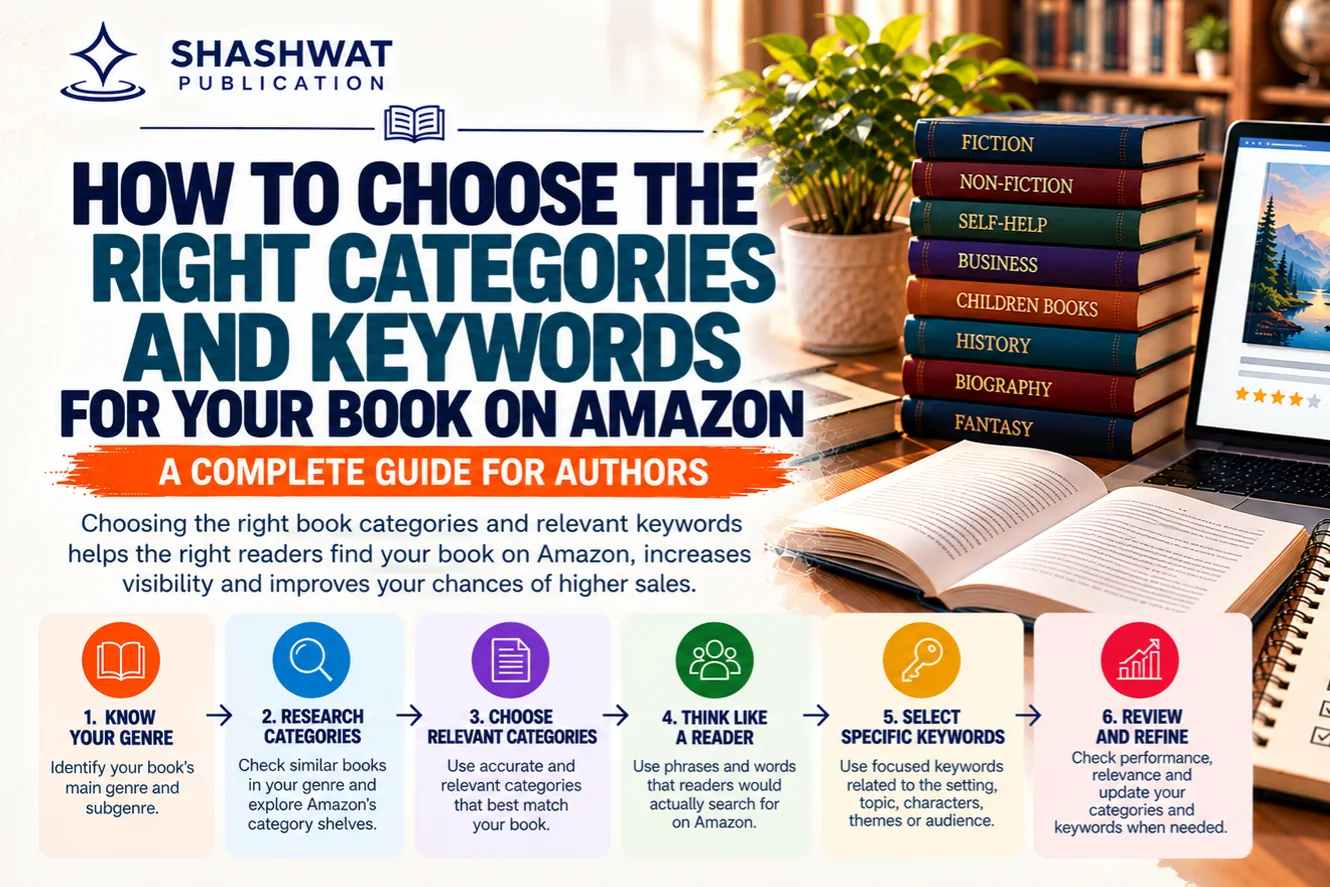
Categories help Amazon understand where your book belongs.
Choosing a category that is too broad can make it difficult for your book to stand out. Choosing an irrelevant category can also create a poor experience for readers.
Amazon recommends balancing popularity and relevance when selecting categories.
For example, if you have written a poetry collection, choose categories related to poetry rather than selecting a broad category simply because it appears popular.
Your category should accurately represent your book.
Keywords help potential readers discover your book when searching on Amazon.
Instead of choosing random keywords, think about what your target readers might actually search for.
For example, a book about Indian travel could target relevant phrases such as:
India travel guide
travel guide India
best places to visit in India
India tourism guide
Indian travel book
For a poetry book, relevant searches may be different.
The keywords should reflect the actual content of your book.
Do not insert unrelated popular keywords simply to attract traffic.
Irrelevant keywords can attract the wrong audience and may result in poor conversions and negative reviews.
Focus on relevance first and search demand second.
Pricing can directly influence your book's sales potential.
Before deciding your Amazon book price, research comparable titles in the same category.
Look at:
Genre
Book length
Format
Author reputation
Reader reviews
Production quality
Competitor pricing
Target audience
Do not automatically choose the lowest possible price.
A book priced too low can sometimes appear less valuable, while an excessively high price can discourage new readers.
KDP currently provides different royalty options for eBooks. For India, the 70% royalty option has specific pricing and eligibility requirements; Amazon's current India pricing table lists ₹99 to ₹599 for the 70% option, while the 35% option has different limits based on file size.
Amazon also states that eBook sales to customers in India are subject to 18% GST, which is deducted before royalty calculations.
Because Amazon can change pricing and royalty policies, authors should always check the current KDP pricing rules before finalizing their book price.
There is no fixed amount that every author earns from Amazon.
Your earnings can depend on:
Book price
Format
Royalty option
Printing costs
Delivery-related costs
Taxes
Marketplace
Discounts or price matching
Number of copies sold
Publishing agreement
For eBooks, Amazon currently offers 35% and 70% royalty options, subject to eligibility and pricing requirements.
For print books, production and printing costs affect the amount remaining after a sale.
Therefore, authors should calculate their expected royalty rather than assuming that the entire selling price becomes income.
Once your book information is ready, upload the appropriate manuscript and cover files.
Before publishing, carefully check:
Spelling
Chapter order
Table of contents
Page breaks
Images
Cover title
Author name
Book description
Pricing
Categories
Keywords
For print books, ordering a proof copy can be useful because it allows you to physically inspect the final product before making the book widely available.
Amazon notes that proof copies are optional, but they allow authors to see the physical book before publication.
Never publish immediately after uploading your files.
Use the available preview tools to check how the book appears.
Look for:
Formatting problems
Missing text
Incorrect page breaks
Image issues
Font problems
Cover alignment
Table of contents errors
Chapter formatting
A few minutes of checking can prevent problems that could affect reader reviews later.
Once you are satisfied with the book details, files, pricing and publishing rights, you can submit the book for publication.
Amazon will review the submission according to its publishing requirements.
After the book becomes available, you can monitor its listing and sales through your publishing account.
Getting your book listed is only the beginning.
If you want to sell more books on Amazon India, focus on discoverability and conversion.
Your listing should communicate your book's value quickly.
Focus on:
Strong title and subtitle
Professional cover
Clear description
Relevant keywords
Accurate categories
Competitive pricing
Author information
Multiple formats where appropriate
Your listing should make it easy for a potential reader to understand what they are buying.
Readers are more likely to recognize and trust authors who consistently build an online presence.
Create an author identity across relevant platforms.
You can share:
Writing updates
Book excerpts
Quotes
Behind-the-scenes content
Reader reviews
Book launch announcements
Interviews
Educational content
Author stories
An author website can also become a central place for your books, biography, contact information and publishing updates.
Instagram can be useful for visually promoting books.
You can create:
Book Reels
Quote posts
Cover reveals
Character introductions
Short readings
Author videos
Launch announcements
Reader testimonials
The key is to create content that is useful or interesting rather than posting only “buy my book” messages.
YouTube can help authors build a deeper connection with readers.
Ideas include:
Book trailer
Author introduction
Book reading
Chapter discussion
Writing journey
Behind-the-scenes publishing videos
Interviews
Educational videos related to your book
For nonfiction authors, YouTube can be especially useful because educational videos can introduce readers to the subject covered in the book.
Reviews can influence purchasing decisions.
Instead of trying to manipulate ratings, focus on getting genuine feedback from readers.
You can encourage readers who have actually read your book to share their honest opinions.
A book with authentic reviews can create more trust than a new listing with no reader feedback.
Amazon advertising can help increase visibility, but paid advertising should be approached strategically.
Before spending money, make sure:
Your cover is professional
Your description is strong
Your pricing is competitive
Your book is correctly categorized
Your target audience is clear
Sending paid traffic to a poorly optimized listing can waste your advertising budget.
Do not wait until publication day to start marketing.
A pre-launch campaign can include:
Cover reveal
Author announcement
Book teaser
Short excerpts
Social media posts
Email announcements
Reader community outreach
Launch countdown
Building awareness before publication can help create initial interest.
Many first-time authors make mistakes that can negatively affect their sales.
Publishing quickly is not more important than publishing professionally.
Always proofread and edit your manuscript before making it available.
Your cover needs to compete with other books in your category.
A low-quality cover can reduce clicks even when the content is excellent.
Do not select categories simply because they appear popular.
Amazon recommends choosing categories that are relevant to the book and balancing reader interest with discoverability.
Keywords should help relevant readers find your book.
Do not use unrelated search terms simply because they have high search volume.
A weak description can make it difficult for readers to understand why they should purchase the book.
Compare similar books before deciding your price.
Publishing on Amazon does not guarantee immediate sales.
Successful authors often need consistent marketing, audience building and optimization.
Yes, digital publishing can provide opportunities for Indian-language authors.
Amazon KDP currently supports eBook publishing in languages including Hindi, Tamil, Malayalam, Marathi and Gujarati. However, Amazon's current guidance states that paperback publishing for these Indian languages is not available through KDP at this time.
This makes it particularly important for regional-language authors to understand the format and distribution limitations before selecting their publishing route.
Authors interested in Hindi publishing can also explore professional Hindi book publishing options and compare the available publishing approaches.
Yes, authors can offer different formats when the relevant publishing and distribution options are available.
Offering both digital and physical editions can help reach readers with different preferences.
For example:
eBook: Suitable for readers who prefer instant digital access.
Paperback: Suitable for readers who prefer physical books.
When multiple formats are created properly, Amazon can connect the editions on the book's detail page.
There is no single answer for every author.
This may suit authors who want to manage:
Publishing
Pricing
Metadata
Uploads
Marketing
Sales monitoring
A publishing company can be useful when you need professional support with:
Editing
Proofreading
Cover design
Formatting
ISBN support
Printing
Distribution
Marketing
Authors should compare the services, costs, rights, royalties and responsibilities before choosing a publishing arrangement.
If you are considering self-publishing, you can also read this guide on the self publishing process in India.
Publishing and selling a book involves much more than uploading a manuscript.
Authors may need professional assistance with editing, proofreading, cover design, formatting, printing, distribution and marketing.
Shashwat Publication provides publishing support for authors across different stages of the publishing journey.
Depending on the author's requirements, professional publishing support can help prepare a book for both print and digital distribution while reducing the technical workload for the author.
You can explore the company's book publishing house services to understand the broader publishing support available.
Before publishing, use this checklist:
Manuscript completed
Professional editing completed
Proofreading completed
Cover professionally designed
Interior properly formatted
Book description written
Relevant keywords researched
Relevant Amazon categories selected
Publishing rights confirmed
ISBN requirements checked
Price researched
Royalty option reviewed
Manuscript uploaded
Cover uploaded
Book preview checked
Proof copy reviewed if applicable
Author profile prepared
Marketing plan created
Social media promotion planned
Learning how to sell your book on Amazon India is not simply about uploading your manuscript. Successful book selling requires a combination of professional publishing, strong metadata, attractive presentation, competitive pricing, relevant keywords, appropriate categories and continuous marketing.
Amazon KDP can provide authors with a direct route to publishing eligible digital and print books, while professional publishing companies can help authors manage the broader process of editing, design, printing, distribution and promotion.
For first-time authors, the most important approach is to think beyond publication. Your goal should be to create a professional book, make it easy for the right readers to discover, and build a long-term author presence.
With the right preparation and consistent promotion, Amazon can become an important channel for reaching readers in India and beyond.
+91 99930 01841 | +91 99936 08164 | ssupport@shashwatpublication.com
2nd Floor, HN 46, Balaji Residency, Seept Road, Bilaspur, C.G 495001

Can’t find what you are looking for? Drop an email to support@shashwatpublication.com
Yes. Authors can use eligible Amazon publishing options such as KDP to publish and sell books, subject to Amazon's current requirements, rights and format availability.
You can start by preparing your manuscript and cover, creating a KDP account if using KDP, entering your book details, uploading the required files, selecting pricing and royalty options, reviewing the book and submitting it for publication.
The cost depends on how you publish the book. With KDP, publishing itself does not require the same type of upfront inventory investment as traditional bulk printing, while print books have production costs that affect royalties. Additional expenses may include editing, cover design, formatting and marketing.
The availability of paperback distribution depends on the publishing and distribution route. Authors should check the current KDP marketplace and distribution requirements before selecting their publishing method.
Royalty depends on the format, marketplace, pricing option and applicable costs. For KDP eBooks, Amazon currently offers 35% and 70% royalty options subject to eligibility and pricing conditions.
Hindi eBook publishing is currently supported through KDP. Amazon's current guidance states that paperback publishing for supported Indian languages such as Hindi is not available through KDP at this time.
Improve your book cover and description, choose relevant categories and keywords, set competitive pricing, build genuine reviews, promote your book through social media and content marketing, and maintain a consistent author brand.
ISBN requirements depend on the format and publishing route. KDP provides ISBN-related options during book setup for applicable print formats, and authors should check the current requirements for their specific edition before publishing.
Royalty payment timing depends on the marketplace and payment method. Amazon states that royalties are generally paid approximately 60 days after the end of the month in which the sale was reported, subject to applicable payment thresholds and conditions.
KDP can be a useful option for first-time authors who want to publish independently and manage their book listing, pricing and publishing process. However, authors should still invest in professional editing, cover design, formatting and marketing to improve the overall quality and sales potential of the book.


Dear Team, I would like to express my sincere appreciation for the seamless book publishing experience. As this is my debut publication, I will certainly be recommending Shashwat Publication.
I write this to express my deep sense of appreciation and gratitude to Shashwat Publication for publishing my first book in a time bound and professional manner. The first call from Ms Swati and her subsequent interactions, followed by dealing with ... Read More
Very Good publications
Publishing Experience with Shashwat Publications My experience with Shashwat Publications has been a fulfilling and memorable journey. From the initial stages of manuscript preparation to the final publication of my book, The Dental Prescriber: Fro... Read More
About Publishing Experience with Us As a first-time author with Shashwat Publications, I look forward to a professional, collaborative, and enriching publishing experience. I appreciate the opportunity to present this work to students and educators... Read More
I am satisfied with the work, it was not too long time taken by the publishers. Also the price is appropriate for publishing the book. I recommend other authors too, must have experience once with this publication. Worthy experiences. Thanks :)

B-75, Krishna Vihar, Koni, Bilaspur, C.G 495001
support@shashwatpublication.com
Timing
Important Pages
All rights are reserved by Aadeera Corporation Private Limited
Terms & Condition Apply