12-10-2026
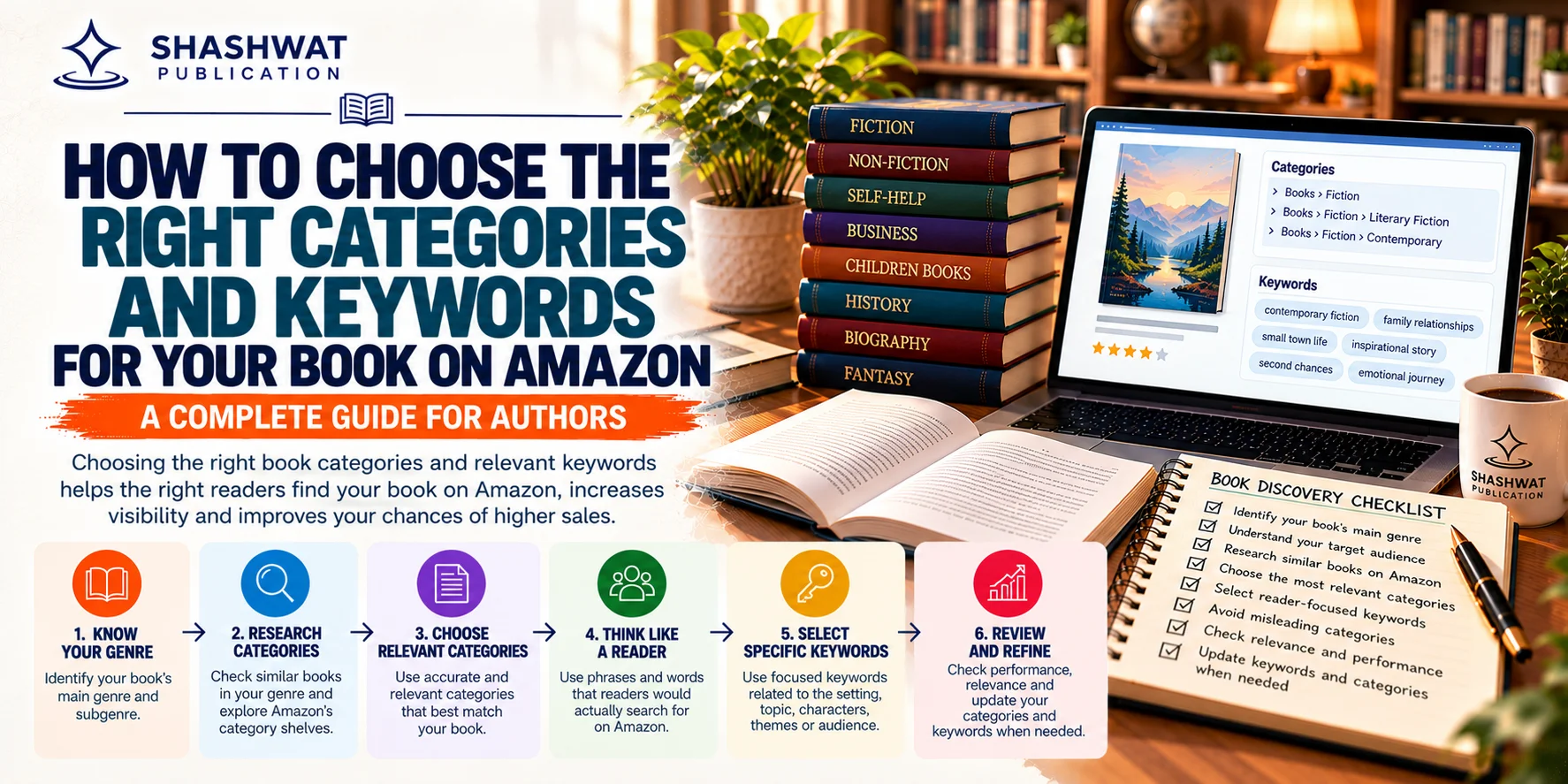
Publishing a book is only the first step in reaching readers. Once your book is available on Amazon, potential readers need ways to discover it among thousands of other titles. Two important parts of this process are choosing relevant book categories and selecting appropriate keywords.
Categories help organise books into genres and subject areas, while keywords help describe the topics, themes and reader interests associated with a book. Together with your title, subtitle, book description and other metadata, these details help communicate what your book is about.
However, choosing categories and keywords is not simply about finding the most popular terms. The most useful choices accurately describe your book and match the language your intended readers use when searching.
In this guide, you will learn how to choose suitable categories, research relevant keywords, optimise your book's metadata and avoid mistakes that can make your book harder to discover.
Book categories are sections of the Amazon store that organise books according to genres, subjects and other relevant characteristics.
Think of them as shelves in a physical bookstore. A mystery novel belongs in a category related to mystery or crime fiction, while a book about personal development belongs in an appropriate self-help or personal growth category.
Categories help readers browse books according to their interests rather than relying only on search queries.
For example, a historical novel might fit a historical fiction category, while a book about professional development may fit a relevant business or career category. The exact category options depend on the book's format, primary marketplace and the categories currently available during setup.
Amazon KDP allows authors to select up to three categories during book setup. These categories should accurately reflect the book's content and intended readership. <Cite refs={["turn888378search0","turn888378search5"]}/>
Keywords are words or phrases that describe a book and help communicate what readers might search for when looking for it.
They can describe a book's subject, setting, audience, themes, characters or other distinctive features.
For example, an author publishing a guide about mindful living might research terms related to mindfulness, daily habits, stress management and personal well-being.
A fiction writer may focus on relevant genres, character types, settings or story themes.
Amazon KDP allows authors to use up to seven keyword fields for a book. Its guidance recommends choosing accurate, specific terms that reflect the book's content and the language readers are likely to use. <Cite refs={["turn888378search1","turn888378search6"]}/>
Keywords should not be selected simply because they are popular. An unrelated keyword may attract the wrong audience and create a misleading shopping experience.
Categories and keywords contribute to the information used to describe and organise a book on Amazon.
Choosing them carefully can help improve the relevance of your book's metadata.
Readers search for books using different terms. Some search by genre, while others look for a specific subject, problem, theme or type of reader experience.
Relevant keywords help describe these characteristics.
Categories establish the broader subject or genre, while keywords can describe more specific aspects.
For example, a broad category might indicate that a book is a self-help title, while suitable keywords may communicate that it focuses on daily habits or confidence building.
Accurate metadata helps ensure that your book is presented to readers who are likely to be interested in its content.
This is especially important when a book covers a specialised topic or combines multiple related subjects.
When readers find a book through a relevant category or search term, they can more easily determine whether it matches their needs.
Unrelated metadata can create confusion and may lead readers to overlook a book that would otherwise suit them.
Categories and keywords work alongside other book details, including the title, subtitle, description, author information and cover.
They should therefore be reviewed as part of the complete publishing setup rather than treated as a standalone ranking technique.
Important: Accurate metadata can support discoverability, but it cannot guarantee first-page placement, sales or a specific bestseller ranking. Search results depend on multiple factors and can change over time. <Cite refs={["turn888378search8","turn888378search11"]}/>
Selecting suitable categories starts with understanding your book and identifying where its intended readers are likely to browse.
Begin by deciding what type of book you have written.
Common book types include:
Fiction
Romance
Mystery and thriller
Science fiction and fantasy
Poetry
Biography and memoir
Self-help
Business and management
Education
Academic and research books
Children's books
History
Health and lifestyle
These are broad examples rather than a complete list of available categories. The actual options vary by marketplace and format.
Choose the category that most accurately describes the main purpose or reading experience of your book.
Look at books that cover a similar subject, target the same audience or belong to the same genre.
Pay attention to how their categories relate to their content.
For example, if you have written a practical guide about building better habits, examine whether comparable books are organised around personal development, productivity or another closely related subject.
Use similar books as research references, not as a reason to copy their metadata blindly. Your own category choices should accurately reflect your book.
A broad category may contain several narrower subcategories.
A general fiction category, for example, may include more specific genres. A non-fiction category may contain specialised subjects related to business, education, history or personal development.
A suitable subcategory can help describe the book more precisely.
However, do not select a narrow category just because it appears easier to compete in. It should still match the book's actual content.
When choosing categories, consider two factors:
Relevance: Does the category accurately describe your book?
Audience fit: Are readers browsing this category likely to be interested in your title?
You can also review how many similar books appear in a category and how closely they match your subject.
The aim is not necessarily to find the category with the fewest competing titles. It is to identify a suitable category that connects your book with its intended readers.
The available categories may differ between Amazon marketplaces and book formats.
Choose your primary marketplace according to where you expect most of your sales to occur. Then review the available category options for the relevant edition.
Amazon's official category guidance explains that category availability can vary by marketplace and format. <Cite refs={["turn888378search0","turn888378search5"]}/>
Before submitting your book, verify that each selected category accurately reflects the book's content.
Check the category names, subcategories and placement in your publishing dashboard.
If you later discover a better fit, review the available category update options and confirm the current submission requirements.
Keyword research helps identify the words and phrases that accurately describe your book and align with reader search behaviour.
The process should begin with the book itself rather than a list of popular keywords.
Ask yourself:
Who is most likely to read this book?
What problem does the book address?
What subject does it explain?
What experience does it offer?
What specific topics does it cover?
What language would readers use to describe their needs?
The answers provide a starting point for generating keyword ideas.
Create a list of terms related to your book's central subject.
For a personal development book, the initial list might include:
Personal growth
Daily habits
Self-confidence
Goal setting
Time management
Emotional resilience
Positive routines
These are illustrative examples. The final terms should be selected according to the book's actual content.
For a novel, relevant terms might describe the genre, setting, character types or central themes instead of general non-fiction subjects.
Specific phrases can communicate a book's focus more clearly than broad terms.
For example, a book about improving daily routines may be more accurately described by a phrase such as “building better habits” than by a very broad term such as “life.”
Amazon's keyword guidance recommends using relevant terms and thinking about the words readers would naturally search for. <Cite refs={["turn888378search1","turn888378search6"]}/>
Specificity should not come at the expense of accuracy. A phrase should only be used if it genuinely relates to the book.
Enter relevant topic phrases into Amazon's search bar and observe the suggestions that appear.
These suggestions can provide ideas about how readers express their interests.
You can also inspect the books that appear for a query and assess whether the results match your book's subject.
Search suggestions are useful research clues, but they do not necessarily reveal exact search volume, conversion rates or competition levels.
Study the descriptions of relevant books to identify recurring topic language and audience needs.
Look for terms that describe:
The central subject
The intended reader
The genre
The main problem addressed
Distinctive themes
Relevant settings or character types
Use this information to develop your own keyword list without copying another book's metadata.
Once you have a list, narrow it down to the terms that best represent your book.
Prioritise accuracy, specificity and reader relevance.
Remove terms that:
Describe subjects absent from the book
Repeat information unnecessarily
Make unsupported quality claims
Refer to unrelated authors or books
Misrepresent the genre or audience
Are included solely to attract unrelated traffic
The final keyword list should accurately represent the publication.
Amazon KDP provides up to seven keyword fields. Treat each field as an opportunity to describe a meaningful aspect of the book rather than filling every field with variations of the same broad term. <Cite refs={["turn888378search1","turn888378search6"]}/>
A practical approach is to organise keyword ideas by purpose.
| Keyword Focus | What It Describes | Example for a Relevant Book |
| Main subject | The central topic | Building better habits |
| Reader need | The problem addressed | Improving daily routines |
| Intended audience | The reader the book serves | Personal growth for adults |
| Specific theme | A major subject within the book | Goal setting techniques |
| Approach | How the subject is addressed | Practical habit building |
| Related topic | A closely connected subject | Time management skills |
| Distinctive angle | A genuine feature of the book | Simple daily productivity practices |
These examples are for illustration only. Do not use a phrase unless it accurately describes the actual publication.
If several fields contain nearly identical terms, you may lose the opportunity to communicate other useful aspects of your book.
Instead, consider whether each field adds meaningful information about the subject, audience, setting or theme.
Follow the current keyword field limits and platform guidelines when entering your final selections.
The best keyword approach depends on the type of book being published.
Fiction keywords may describe the genre, story setting, character roles, themes and narrative style.
For example, a mystery novel might be associated with a small-town setting, an amateur detective or a missing-person investigation if those elements are central to the story.
Avoid using a genre or theme that does not accurately describe the book.
Poetry keywords can reflect the main themes and intended audience.
A collection exploring nature, memory and personal experiences may benefit from relevant terms describing those themes.
A poetry book should not be assigned unrelated terms simply because they appear popular.
Self-help keywords may describe the problem addressed, the desired skill or the book's approach.
Examples include confidence building, goal setting, daily habits and personal development, provided those topics are covered in the book.
Academic keywords should accurately represent the research area, discipline, subject terminology and central concepts.
Use precise terminology that students, researchers and professionals would reasonably associate with the publication.
Avoid adding unrelated disciplines merely to expand the potential audience.
For children's books, relevant details may include the age group, reading level, subject, theme and type of story.
Ensure that the selected audience and age information match the book's actual content and intended readership.
Incorrect metadata can create confusion for readers and may violate publishing guidelines.
A category with fewer competing books is not automatically a good choice.
If it does not match the book, it may attract the wrong audience and create an inaccurate shopping experience.
A popular keyword is not useful if it has little connection to your publication.
Focus on the words that accurately describe the book rather than attempting to attract every possible search.
Using multiple variations of the same broad term can waste opportunities to describe more specific aspects of your book.
Review the keyword fields together and remove unnecessary repetition.
Do not use another author's name or unrelated book titles to attract readers.
Keywords should describe your own publication and follow the platform's metadata guidelines. <Cite refs={["turn888378search5","turn888378search6"]}/>
Avoid terms such as “bestseller,” “number one” or “award-winning” as search keywords unless the information is appropriate and permitted under the applicable metadata rules.
Do not use promotional language as a substitute for an accurate description of the book.
Categories and keywords are only part of your book's metadata.
Your description should clearly communicate the subject, intended audience, main benefits or themes, and relevant details. A mismatch between the description and keywords can confuse readers.
Your book's subject, audience or publication details may change between drafting and release.
Review all metadata before publishing and verify that the title, subtitle, author name, description, categories and keywords are accurate.
If you have already published a book, you may be able to review and update its categories or keywords through the publishing dashboard.
The exact options can vary by book format and current platform requirements.
A typical workflow is:
Sign in to your publishing account.
Open your book's listing or bookshelf.
Select the option to edit the book details.
Review the category and keyword fields.
Make appropriate changes.
Save the details and submit the update if required.
Check the live book listing after the changes have been processed.
Amazon's official help documentation describes updating keywords and categories through the book details interface. It also notes that category changes can take time to appear in the store. <Cite refs={["turn888378search0","turn888378search1"]}/>
Do not change metadata repeatedly without a clear reason. Review performance over a reasonable period and make changes when you have evidence that your current selections are inaccurate or could be more relevant.
No single metric can prove that a keyword or category has improved book discoverability.
Instead, review several signals over time.
Search for the phrases you selected and assess whether your book appears in relevant results. Remember that search results can vary by marketplace, location, personalisation and time.
If your available reporting tools provide traffic information, review whether readers are visiting the book's page.
Compare sales trends over time while considering other factors such as pricing, promotions, availability and seasonality.
Reviews and reader feedback may reveal whether the book is reaching the intended audience and meeting their expectations.
Even if sales are limited, you can still evaluate whether the categories and keywords accurately describe the publication.
Search ranking alone should not be the only basis for evaluating a metadata decision. Amazon states that search results can be influenced by multiple factors and are not guaranteed to remain in a particular position. <Cite refs={["turn888378search8","turn888378search11"]}/>
Choosing categories and keywords is one part of preparing a book for publication. Authors also need to consider manuscript quality, book design, metadata, distribution and marketing.
Shashwat Publication offers publishing services for authors working on different types of books.
Depending on the selected package and agreement, publishing support may include editing, proofreading, cover design, interior formatting, ISBN-related assistance, printing, distribution and marketing.
Authors should confirm which services are included and whether guidance on book metadata or marketplace listing preparation is available under their chosen arrangement.
You can explore self-publishing in India to learn more about the publishing process and the services available for authors.
Before submitting your book, use this checklist to review the metadata.
The primary category matches the book's genre or subject.
The selected categories are relevant to the intended readership.
The categories are available for the chosen marketplace and format.
The keyword list reflects the actual book content.
Specific phrases describe genuine subjects or themes.
Unrelated terms have been removed.
Other authors' names and unrelated book titles are not being used as keywords.
Repetitive keyword variations have been reviewed.
The title, subtitle and description are accurate.
All metadata has been checked before publication.
Choosing the right categories and keywords for your book on Amazon begins with understanding your content and your intended readers. Categories help organise a book within the store, while keywords describe specific subjects, themes, settings and reader interests.
The most effective approach is to research relevant categories, study how readers describe similar books, select accurate search phrases and review your metadata before publishing.
Avoid choosing categories solely because they appear less competitive, and do not use unrelated keywords to attract additional traffic. Accurate metadata provides a clearer description of your book and supports a better experience for readers.
Remember that categories and keywords are only part of a wider publishing strategy. A clear title, useful description, professional cover, suitable pricing and effective marketing also contribute to how readers discover and evaluate your book.
By reviewing these elements carefully, authors can create a more accurate and reader-focused book listing.
+91 99930 01841 | +91 99936 08164 | ssupport@shashwatpublication.com
2nd Floor, HN 46, Balaji Residency, Seept Road, Bilaspur, C.G 495001

Can’t find what you are looking for? Drop an email to support@shashwatpublication.com
Amazon KDP allows authors to select up to three categories during book setup. Available options depend on the book's format, audience and primary marketplace. Categories should accurately reflect the publication.
Amazon KDP provides up to seven keyword fields. Authors should use relevant terms that describe their book's subject, themes, audience, setting or other distinctive features.
Start by identifying your book's subject, target audience and main themes. Research relevant Amazon search suggestions and similar books, then choose accurate terms that readers might naturally use when searching.
Not automatically. Relevance should come first. A category with fewer competing books is not suitable if it does not accurately describe your publication or intended audience.
Amazon KDP provides options to edit book details, including categories and keywords, subject to current platform requirements. Changes may take time to appear in the store.
Review the complete metadata before adding keywords. Amazon's guidance recommends avoiding terms already covered elsewhere in the book's metadata or categories when they do not add useful information. Use keyword fields to describe additional relevant aspects of the book.
No. Do not use unrelated authors' names or other people's book titles to attract readers. Keywords should accurately describe your own publication and comply with the platform's metadata rules.
No. Relevant categories and keywords can help describe and organise a book, but they do not guarantee a specific search position, sales volume or bestseller ranking.
Not necessarily. Each book has its own subject, audience and themes. Select keywords that accurately describe the individual publication rather than automatically reusing the same list for every title.
Shashwat Publication offers publishing services that may include editing, proofreading, cover design, formatting, ISBN-related assistance, printing and distribution, depending on the selected package. Authors should confirm whether marketplace metadata guidance is included in their arrangement.


Dear Team, I would like to express my sincere appreciation for the seamless book publishing experience. As this is my debut publication, I will certainly be recommending Shashwat Publication.
I write this to express my deep sense of appreciation and gratitude to Shashwat Publication for publishing my first book in a time bound and professional manner. The first call from Ms Swati and her subsequent interactions, followed by dealing with ... Read More
Very Good publications
Publishing Experience with Shashwat Publications My experience with Shashwat Publications has been a fulfilling and memorable journey. From the initial stages of manuscript preparation to the final publication of my book, The Dental Prescriber: Fro... Read More
About Publishing Experience with Us As a first-time author with Shashwat Publications, I look forward to a professional, collaborative, and enriching publishing experience. I appreciate the opportunity to present this work to students and educators... Read More
I am satisfied with the work, it was not too long time taken by the publishers. Also the price is appropriate for publishing the book. I recommend other authors too, must have experience once with this publication. Worthy experiences. Thanks :)

B-75, Krishna Vihar, Koni, Bilaspur, C.G 495001
support@shashwatpublication.com
Timing
Important Pages
All rights are reserved by Aadeera Corporation Private Limited
Terms & Condition Apply